Brush Stamps Bone Number: Streamlining Digital Art with Procreate
Digital illustration has evolved from a niche hobby into a robust professional industry, and with that evolution comes the demand for efficiency. Artists are no longer just painters; they are designers, animators, and content creators who need to produce high-quality work under tight deadlines. This is where specialized tools like the Brush Stamps Bone Number set become indispensable. Unlike standard fonts or text tools, this resource is designed specifically for the Procreate ecosystem on iPad, offering a tactile, organic approach to incorporating numerical elements into artwork.
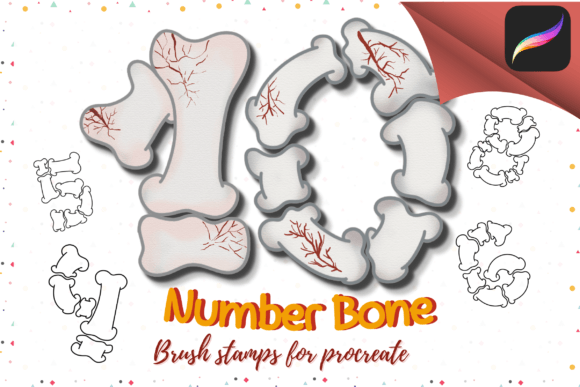
Understanding the distinction between a font and a brush stamp is crucial for maximizing your workflow. A font is rigid, uniform, and often feels disconnected from hand-drawn art. In contrast, the Bone Number 10 brush stamp file provides pre-rendered, artistic numerals that behave like paint. When you tap the screen, you aren't typing; you are stamping a piece of art that already possesses texture, weight, and character. This subtle difference can dramatically elevate the aesthetic cohesion of a piece, ensuring that numbers blend seamlessly with sketches, watercolors, or digital paintings rather than sitting awkwardly on top of them.
Real-World Applications for Creators
The versatility of the Procreate Brush Stamps Bone Number set extends far beyond simple labeling. Its utility shines in various professional and creative scenarios where visual harmony is paramount. Consider the world of educational content creation. Teachers and tutors who create digital worksheets, flashcards, or instructional videos on their iPads often struggle to find number styles that match their hand-drawn diagrams. Using a standard sans-serif font next to a sketched apple or a hand-drawn map creates visual dissonance. By using these bone-style number stamps, educators can maintain a consistent, friendly, and approachable aesthetic that keeps students engaged without the distraction of mismatched design elements.
Another significant beneficiary of this toolset is the tabletop gaming community. Dungeon Masters and game designers frequently create custom character sheets, inventory lists, and campaign maps. The "bone" aesthetic implies an ancient, rustic, or fantasy theme, which is perfect for role-playing games set in medieval or mythical worlds. Instead of spending hours drawing each number by hand for a treasure count or a health tracker, a creator can simply select the appropriate number from the brush library and stamp it onto the canvas. This saves immense amounts of time while preserving the immersive, hand-crafted feel of the game materials.
Journaling enthusiasts and digital planners also find immense value in this resource. The bullet journaling community thrives on personalization and aesthetics. When tracking habits, logging dates, or numbering pages in a digital planner, users often want their entries to look organic and integrated with their doodles and headers. The Brush Stamps Bone Number allows for quick insertion of dates and list items that feel like part of the artistic composition rather than an afterthought. It adds a layer of texture and depth that plain text simply cannot achieve, making daily logs visually appealing and satisfying to review.
Technical Integration and Workflow Efficiency
One of the primary strengths of this tool is its seamless integration into the Procreate environment. Since it is distributed as a zipped file containing the brush set, the installation process is straightforward for anyone familiar with the app. Users download the file, unzip it, and choose the “Open In Procreate” option. The app automatically installs the brushes, placing them directly into the Brush Library. This immediacy means there is no complex setup, no font management software required, and no compatibility issues with third-party apps. It works natively within the interface artists already use every day.
From a technical standpoint, using brush stamps offers unique advantages over vector text. Because these are raster-based stamps, they interact with Procreate’s blending modes and layer effects just like any other brush stroke. You can change the color, adjust the opacity, or apply gaussian blur to make the numbers recede into the background. You can also use the transform tool to rotate, skew, or resize them without losing the artistic integrity of the shape. This flexibility allows for dynamic compositions where numbers can be woven into illustrations, perhaps appearing as if they are carved into stone or written in chalk, depending on the underlying texture and color choices.
However, it is important to note the limitations inherent to this format. Since these are brush stamps and not editable text layers, you cannot simply backspace and correct a typo as you would with a text box. If you stamp a "6" instead of a "9," you must erase it and restamp the correct number. This requires a slight shift in mindset from typographic editing to artistic placement. For many artists, this is actually a benefit, as it encourages more intentional design decisions, but it is a consideration for those used to the fluidity of word processing.
Design Considerations and Aesthetic Impact
When deciding whether to incorporate the Bone Number 10 brush stamp into your project, consider the overall tone of your artwork. The "bone" style suggests durability, age, and natural materials. It works exceptionally well in themes involving nature, history, fantasy, horror, or rustic crafts. It might feel out of place in a sleek, modern tech interface or a minimalist corporate presentation. Understanding the semantic weight of your design choices ensures that the tool enhances rather than detracts from your message.
Furthermore, the size and resolution of your canvas matter. Because these are stamps, they have a fixed resolution based on how they were created. While Procreate handles scaling reasonably well, extreme enlargement may reveal pixelation or loss of detail. It is best practice to test the stamps at your intended working size early in the process. If you are creating large-format prints, ensure your canvas DPI is set high enough to accommodate the detailed textures of the bone numbers. This proactive step prevents disappointment during the final export phase.
The collection includes ten distinct number brushes, covering the essential digits needed for most applications. This curated selection prevents decision fatigue. Rather than sifting through hundreds of font variations, you have a cohesive set that guarantees visual consistency. Whether you are numbering steps in a recipe illustration, marking zones on a fantasy map, or adding page numbers to a digital zine, the uniform style ties the entire document together. This consistency is key to professional-looking results, especially for self-published authors and indie designers who manage all aspects of their product creation.
Supporting the Creative Community
Purchasing resources like the Procreate Brush Stamps Bone Number set from independent creators such as VeloonaP Store supports the broader digital art ecosystem. These small businesses invest time in crafting high-quality, niche tools that large software companies often overlook. By choosing specialized brush sets, artists gain access to unique styles that help their work stand out in saturated markets like social media and online marketplaces.
Moreover, the ease of use encourages experimentation. Artists who might hesitate to draw complex lettering due to lack of confidence can now incorporate sophisticated numerical elements with a single tap. This lowers the barrier to entry for complex compositions, allowing beginners to achieve professional-looking results and enabling experts to speed up their repetitive tasks. The result is a more vibrant, diverse range of digital art that pushes the boundaries of what is possible on the iPad.
In conclusion, the Brush Stamps Bone Number set is more than just a collection of digits; it is a workflow enhancer and a stylistic tool. It bridges the gap between functional information and artistic expression, offering a practical solution for educators, gamers, planners, and illustrators alike. By understanding its proper application and integrating it thoughtfully into your Procreate workflow, you can elevate the visual quality of your projects while saving valuable time. Welcome to the world of efficient, beautiful digital creation, and thank you for supporting creators like VeloonaP who make these tools possible.