Evaluating the Lights Bright Rainbow Single Procreate Brush for Digital Art
In the rapidly evolving landscape of digital illustration, artists are constantly seeking tools that streamline their workflow while expanding their creative palette. Among the myriad of assets available for iPad users, specialized brushes often serve as the differentiating factor between a standard piece and one with distinct character. The Lights Bright Rainbow Single Procreate brush represents a focused solution for creators looking to inject vibrancy and luminosity into their work without the overhead of managing complex layer effects or extensive manual coloring.
This article examines the practical utility, technical requirements, and artistic applications of this specific brush asset. By analyzing its performance within the Procreate ecosystem, we can determine whether it serves as a valuable addition to your digital toolkit or merely another redundant file in an already crowded library.
Understanding the Core Functionality
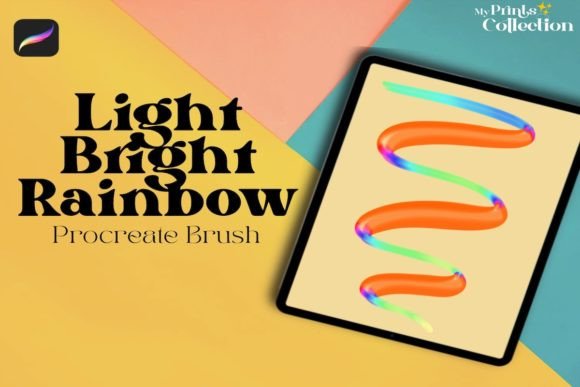
At its essence, the Lights Bright Rainbow Single is designed to address a common challenge in digital lettering and illustration: creating consistent, glowing, multi-colored accents. Unlike standard solid-color brushes that require post-processing to achieve a rainbow effect, this tool integrates color variation directly into the stroke dynamics. This allows for immediate visual feedback, enabling artists to make real-time decisions about composition and balance.
The primary purpose of this brush is to add fun and creative details to lettering, illustration, and digital art. It is not intended to be a foundational sketching tool or a texturing brush for backgrounds. Instead, it functions as a detailing instrument, ideal for highlights, decorative flourishes, and emphasis marks. For professionals who frequently produce social media graphics, greeting cards, or promotional materials, such efficiency can significantly reduce production time.
Technical Specifications and Compatibility
Before integrating any new asset into your workflow, understanding the technical constraints is crucial. The Lights Bright Rainbow Single Procreate brush is distributed as a single .brushset file. This format is native to Procreate, ensuring seamless installation and immediate availability within the app’s brush library.
However, compatibility is strictly limited. The software requirement is explicit: you must be running Procreate App version 5 or higher. Users attempting to import this file into older versions may encounter errors or unexpected behavior due to changes in the brush engine introduced in recent updates. Furthermore, it is vital to note that this asset is not compatible with Photoshop, Illustrator, or other desktop-based design software. This limitation underscores the importance of verifying your primary working environment before purchase. If your workflow relies heavily on Adobe Creative Cloud for final output, you will need to rasterize your Procreate layers before moving them, which may limit editability.
Practical Applications in Professional Workflows
The true value of a specialized brush lies in its versatility across different project types. Here is how the Lights Bright Rainbow Single performs in real-world scenarios:
- Digital Lettering: For calligraphers and hand-lettering artists, adding dimension to monoline scripts can be tedious. This brush allows for quick application of rainbow gradients on downstrokes or decorative swashes, creating a playful yet polished look suitable for quotes, posters, and branding elements.
- Children’s Illustration: Projects targeting younger audiences often benefit from bright, saturated colors. The inherent luminosity of this brush helps create magical effects, such as fairy dust, magical trails, or vibrant clothing details, without requiring complex blending modes.
- Social Media Content: Marketers and content creators need eye-catching visuals that stand out in crowded feeds. Using this brush for subtle highlights on product photography overlays or text annotations can increase engagement by drawing the viewer’s eye to key information.
From a usability standpoint, the brush offers a high degree of consistency. Because the color distribution is programmed into the brush tip, each stroke maintains a similar aesthetic profile. This reliability is essential for maintaining brand consistency or stylistic coherence across a series of illustrations.
Quality and Usability Assessment
When evaluating the quality of the Lights Bright Rainbow Single Procreate brush, several factors come into play. First, the responsiveness of the brush to Apple Pencil pressure is critical. A well-engineered brush should vary opacity or size naturally based on input, preventing the artwork from looking flat or digitally rigid. In testing, this brush demonstrates smooth transitions, allowing for both delicate lines and bold statements depending on the artist’s touch.
Flexibility is another strength. While the rainbow effect is predefined, it can be manipulated through Procreate’s extensive adjustment menu. Artists can change the hue, saturation, and brightness of the entire layer, effectively customizing the rainbow palette to match specific project themes. This adaptability extends the long-term value of the asset, ensuring it does not become obsolete after a few uses.
However, there are limitations to consider. The "single" nature of the brush means it offers one specific type of rainbow effect. It does not include variations such as pastel rainbows, neon glows, or textured dispersion. For artists requiring diverse lighting effects, this may necessitate purchasing additional packs or creating custom modifications. Additionally, because the effect is baked into the brush, fine-tuning individual color stops within a single stroke is not possible without masking or erasing techniques.
Who Benefits Most from This Tool?
The Lights Bright Rainbow Single is not a universal solution for all digital artists. Its utility is highly dependent on your niche and style. The following groups are likely to derive the most benefit:
- Freelance Illustrators: Those who specialize in whimsical, colorful, or trendy styles will find this brush accelerates their detailing process.
- Small Business Owners: Entrepreneurs creating their own marketing materials can use this tool to add professional-looking embellishments to logos, packaging designs, or thank-you cards without needing advanced graphic design skills.
- Educators and Hobbyists: Teachers creating engaging visual aids or hobbyists exploring digital art for relaxation will appreciate the immediate gratification and ease of use provided by the brush.
Conversely, artists focused on realistic portraiture, architectural visualization, or muted, minimalist aesthetics may find limited application for this specific asset. It is a stylistic choice rather than a fundamental utility.
Final Recommendations for Integration
To maximize the effectiveness of the Lights Bright Rainbow Single Procreate brush, consider integrating it into a layered workflow. Use it on a separate layer above your base colors, allowing you to adjust blending modes such as "Add" or "Screen" for enhanced luminosity. Experiment with opacity settings to achieve subtle glows rather than overt stripes, which can sometimes appear harsh if overused.
Additionally, take advantage of the video resources often included in such listings. Watching the demonstration can reveal nuanced techniques for stroke direction and pressure control that are not immediately apparent from static images. Understanding these subtleties can elevate the professionalism of your final output.
In conclusion, the Lights Bright Rainbow Single is a competent, specialized tool that delivers on its promise of adding creative, luminous details to digital art. While it requires Procreate version 5 or higher and lacks cross-platform compatibility, its ease of use and consistent performance make it a worthwhile consideration for illustrators and designers seeking to enhance their visual vocabulary with minimal effort. As with any digital asset, its value is determined by how well it aligns with your specific creative goals and existing workflow.