Evaluating Vegetable Procreate Brush Stamps for iPad Illustration
Digital illustration has evolved significantly with the advent of powerful tablet applications like Procreate. Among the vast array of tools available to artists, specialized brush sets offer a unique way to streamline workflow and enhance creative output. One such resource gaining attention is the Vegetable Procreate Brush Stamps IPAD collection. This set provides a curated selection of hand-drawn vegetable illustrations designed specifically for use within the Procreate environment on iPad. Understanding the utility, limitations, and practical applications of these digital assets can help illustrators, designers, and hobbyists determine if they align with their current project needs.
Understanding the Asset Collection
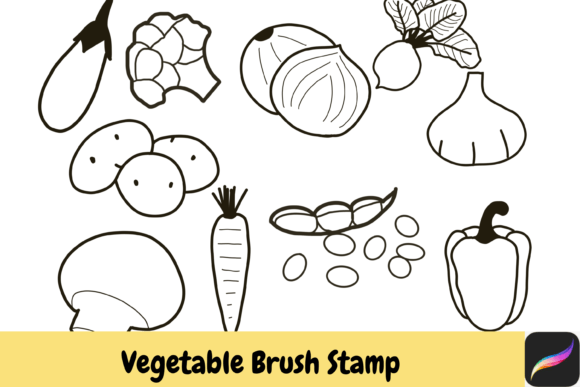
The core of this product is a library of ten distinct, hand-drawn vegetable stamps. These include Beetroot, Broccoli, Pea, Carrot, Capsicum, Eggplant, Garlic, Mushroom, Onion, and Potatoes. Unlike standard photographic overlays, these are stylized, artistic representations that retain the charm of manual sketching. The term "stamps" in this context refers to pre-rendered shapes or brushes that, when tapped or dragged onto the canvas, instantly place the illustrated vegetable. This mechanism differs from drawing each element from scratch, offering a significant time-saving advantage for repetitive design tasks.
These assets are delivered as an instant download, typically in a compressed file format that requires unzipping before use. It is crucial for users to note that these brushes are engineered exclusively for Procreate on iPad. They are not compatible with desktop software like Photoshop or other mobile drawing apps unless those platforms support specific brush import formats that match Procreate’s structure. Therefore, compatibility is a primary consideration before purchase.
Practical Benefits for Digital Artists
The primary appeal of the Vegetable Hand Drawn Brush Stamps lies in efficiency and consistency. For artists working on pattern designs, packaging mockups, or educational materials, manually drawing the same vegetable multiple times can be tedious and may result in inconsistent styling. Using stamp brushes ensures that every carrot or mushroom maintains the same artistic integrity and line weight, creating a cohesive visual language throughout the piece.
Another significant benefit is customization. While the base shapes are pre-defined, Procreate’s robust color engine allows users to alter the hue, saturation, and brightness of each stamp effortlessly. By selecting a color from your palette before applying the stamp, or by using adjustment layers afterward, you can adapt the vegetables to fit any color scheme. This flexibility means that a single set of black-and-white or monochrome sketches can serve multiple projects with different aesthetic requirements.
Furthermore, the hand-drawn nature of these stamps adds a layer of organic warmth that vector graphics sometimes lack. The slight imperfections and texture inherent in hand-drawn art can make digital designs feel more approachable and human-centric, which is particularly valuable in branding for organic food products, farmer’s markets, or health-focused blogs.
Commercial Use and Licensing Considerations
For professionals, the licensing terms are a critical factor. This specific collection allows for small commercial use, which opens up opportunities for freelancers and small business owners. You can incorporate these vegetable stamps into designs for clients, such as menu designs, social media graphics, or printed merchandise, provided the usage falls within the defined "small commercial" scope. However, it is essential to read the accompanying license agreement carefully to understand the limits on sales volume or distribution methods. Reselling the brush files themselves is strictly prohibited; the value lies in integrating them into larger, original compositions.
Tradeoffs and Limitations
While convenient, relying on stamp brushes comes with tradeoffs. The most notable limitation is the lack of absolute uniqueness. Since these are pre-made assets, other artists may possess the same set. If distinctiveness is paramount for a high-profile brand identity, custom illustration remains the superior choice. Additionally, because these are raster-based stamps rather than vector paths, scaling them up significantly beyond their original resolution may result in pixelation or loss of clarity. Users must be mindful of the canvas size and resolution settings in Procreate to ensure the stamps remain crisp.
Another consideration is the learning curve associated with managing brush libraries. New users may need to familiarize themselves with how to import, organize, and adjust brush settings within Procreate. While the process is straightforward, it requires a basic understanding of the app’s interface. Moreover, since the file requires unzipping, users must have a file management app on their iPad capable of handling ZIP archives, which is standard but worth noting for those new to digital asset management.
Ideal Use Cases
The Vegetable Procreate Brush Stamps IPAD set is particularly well-suited for several scenarios:
- Pattern Design: Creating seamless repeats for textiles, wrapping paper, or digital backgrounds where repeated elements are necessary.
- Editorial Illustration: Adding quick, decorative elements to articles about nutrition, gardening, or cooking without spending hours on detailed rendering.
- Social Media Content: Producing consistent, aesthetically pleasing graphics for Instagram or Pinterest posts related to food and lifestyle.
- Educational Materials: Developing engaging visuals for children’s books or learning apps where clear, recognizable vegetable shapes are needed.
In these contexts, the speed of deployment outweighs the need for bespoke illustration. The ability to rapidly populate a scene with beetroot, broccoli, or peas allows the artist to focus on composition and layout rather than individual element creation.
When to Consider Alternatives
There are situations where this tool may not be the best fit. If you require highly realistic, photorealistic vegetables, photographic stock images or 3D modeling might be more appropriate. Similarly, if you need scalable graphics for large-format printing like billboards, vector-based illustrations created in Adobe Illustrator would be a safer choice due to their infinite scalability. Additionally, if you do not own an iPad or do not use Procreate, this asset is unusable, and you should seek PNG clipart packs or brushes compatible with your preferred software.
Making the Decision
Choosing whether to integrate these vegetable stamps into your workflow depends on your specific goals. If you value speed, consistency, and a hand-drawn aesthetic, and you work primarily within the Procreate ecosystem, this collection offers tangible benefits. The inclusion of ten versatile vegetables covers a broad range of culinary themes, providing a solid foundation for various projects. However, if your work demands absolute uniqueness or vector scalability, you may need to supplement these stamps with custom drawings or other tools.
Ultimately, the Vegetable Hand Drawn Brush Stamps serve as a practical enhancement to an illustrator’s toolkit. They bridge the gap between the time-consuming nature of manual drawing and the rigidness of stock photography, offering a flexible, creative middle ground. By understanding both the capabilities and the constraints of these digital assets, you can make an informed decision that supports your artistic vision and operational efficiency.