Mastering Rustic Modern Typography with the Street Grunge Procreate Lettering Brush
In the rapidly evolving landscape of digital illustration, the demand for authentic, hand-crafted aesthetics has never been higher. Designers and artists are increasingly moving away from sterile, vector-perfect lines in favor of textures that convey warmth, history, and human touch. This shift has placed tools like the Street Grunge Procreate Lettering Brush at the forefront of modern creative workflows. As a free resource that bridges the gap between traditional media and digital convenience, this tool offers a unique solution for creators seeking to infuse their work with a grainy, charcoal-infused character.
The appeal of grunge aesthetics lies in its imperfection. It mimics the unpredictable nature of physical materials such as chalk on pavement, charcoal on rough paper, or pencil on textured cardstock. For iPad users leveraging the Apple Pencil, achieving this look digitally can be challenging without the right brush engine settings. The Street Grunge brush addresses this by providing a sophisticated texture map that reacts dynamically to pressure and tilt, allowing for a level of expressiveness that rivals analog methods. Whether you are working on holiday greetings, brand identity projects, or personal sketchbooks, understanding how to utilize this specific tool can significantly elevate the visual impact of your lettering.
Deconstructing the Aesthetic: Grain, Charcoal, and Chalk
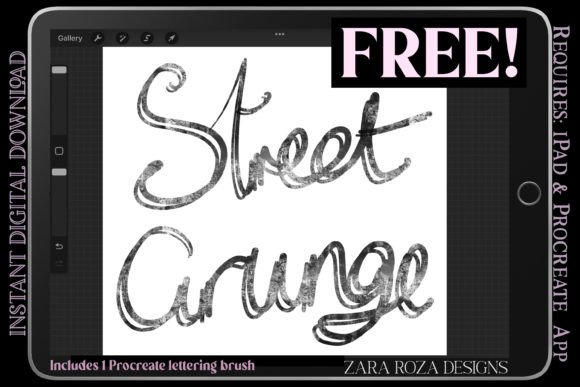
To fully appreciate the utility of this brush, one must understand the specific textural elements it emulates. The term "grunge" in design often refers to a style that is raw, unpolished, and edgy. However, when applied to lettering, it requires a delicate balance. The Street Grunge Procreate Lettering Brush achieves this by integrating three primary textural components: grain, charcoal density, and chalk-like opacity.
The grain component adds a subtle noise to the stroke, preventing the line from appearing too flat or digital. This is crucial for maintaining readability while adding depth. The charcoal aspect provides variable darkness, allowing for deep, rich blacks that mimic the saturation of compressed carbon sticks. Meanwhile, the chalk aesthetic introduces a dry, scratchy quality that works exceptionally well on darker backgrounds or colored papers within the app. Together, these elements create a rustic modern look that feels both contemporary and timeless.
This combination is particularly effective for projects that require a sense of authenticity. For instance, a coffee shop menu designed on an iPad using this brush will convey a handmade, artisanal vibe that resonates with customers seeking organic experiences. Similarly, social media graphics that utilize this texture stand out in feeds dominated by glossy, high-saturation images, offering a visual pause that draws the viewer’s eye through its tactile appearance.
Dual Versatility: Regular vs. Smooth Line Control
One of the most significant advantages of this freebie is its inclusion of two distinct versions, each tailored to different stages of the creative process. Understanding when to switch between the Regular and Smooth Line versions is key to maximizing efficiency and artistic output.
The Regular Version: Embracing Roughness
The Original Version, or regular line control, is designed for artists who prioritize texture and organic variation over precision. This setting allows the brush to capture every micro-movement of the Apple Pencil, resulting in strokes that have a natural jitter and roughness. It is ideal for:
- Rough Sketching: Quickly blocking out ideas where the focus is on composition rather than clean edges.
- Expressive Drawing: Creating illustrations that benefit from a loose, energetic feel, such as urban sketches or character doodles.
- Background Textures: Adding depth to layouts without overpowering the main subject matter.
When using the regular version, artists should embrace the unpredictability. The brush may skip or vary in width unexpectedly, but these "errors" are often what give the piece its charm. It encourages a mindset of experimentation, where the tool collaborates with the artist rather than simply executing commands.
The Smooth Line Version: Precision Meets Texture
In contrast, the Smooth Line Version offers a more streamlined experience. It retains the essential grunge texture but applies additional stabilization to the stroke path. This results in cleaner curves and more consistent line weights, making it suitable for:
- Hand Lettering: Creating legible, polished quotes or titles where clarity is paramount.
- Final Inking: Tracing over rough sketches to produce a finished piece that still retains a handmade aesthetic.
- Detailed Illustrations: Working on smaller elements where excessive jitter might distract from the form.
This version is particularly useful for beginners who may struggle with hand stability or for professionals working under tight deadlines who need reliable results without extensive post-processing. It demonstrates that grunge does not have to mean messy; it can be controlled and intentional.
Practical Applications Across Creative Disciplines
The versatility of the Street Grunge Procreate Lettering Brush extends far beyond simple text creation. Its adaptability makes it a valuable asset across various creative fields, from graphic design to fine art illustration.
Holiday and Seasonal Design
As noted in recent releases, this brush is perfect for creating "Happy Holidays" graphics. The rustic texture evokes feelings of nostalgia and warmth, aligning perfectly with seasonal themes. Designers can use it to craft greeting cards, social media posts, or packaging designs that feel personal and heartfelt. The ability to switch between rough and smooth lines allows for the creation of dynamic compositions where bold headers contrast with delicate subtext.
Brand Identity and Logo Design
For brands aiming to project an image of authenticity, craftsmanship, or eco-friendliness, this brush offers a quick way to prototype logo concepts. While final logos are often vectorized, the initial conceptual phase benefits greatly from the organic feel of grunge lettering. It helps clients visualize how a brand might look in a real-world, tactile context, such as on stamped paper or woven fabric.
Educational Materials and Zines
Educators and independent publishers creating zines or worksheets can use this brush to make materials more engaging. The hand-drawn aesthetic reduces the intimidation factor of dense text, making learning materials feel more approachable and friendly. It is particularly effective in subjects like history, literature, or art, where a vintage or archival look enhances the content.
Optimizing Workflow with iPad and Apple Pencil
To get the most out of this brush, users should consider their hardware settings and workflow habits. The Apple Pencil’s pressure sensitivity is the primary driver of the brush’s behavior. Ensuring that pressure curve settings in Procreate are calibrated to individual preference can drastically change the output. A steeper curve may yield bolder strokes with less effort, while a flatter curve offers more control over subtle gradations.
Additionally, layer management plays a crucial role. Because grunge brushes rely on texture, overlapping strokes can sometimes create muddy areas if the opacity is too high. It is often beneficial to work on separate layers for different elements of the lettering, allowing for non-destructive editing. Using blending modes such as Multiply or Overlay can also enhance the interaction between the brush texture and underlying colors, creating richer visual depth.
Creators should also experiment with canvas resolution. Higher resolutions allow for finer detail in the grain texture, ensuring that the artwork remains crisp even when zoomed in or printed. However, larger canvases require more processing power, so finding a balance between quality and performance is essential for a smooth drawing experience.
The Role of Free Resources in Professional Growth
The availability of high-quality freebies like the Street Grunge Procreate Lettering Brush democratizes access to professional-grade tools. For hobbyists and students, it removes financial barriers to entry, allowing them to explore advanced techniques without investment risk. For seasoned professionals, it provides a quick solution for specific stylistic needs, expanding their toolkit without the time commitment of creating custom brushes from scratch.
Moreover, these resources foster a community of sharing and learning. When artists download and use such brushes, they often share their results online, inspiring others and demonstrating new possibilities. This cycle of creation and dissemination drives innovation in the digital art community, pushing the boundaries of what is possible with apps like Procreate.
In conclusion, integrating this grunge lettering brush into your digital arsenal offers more than just a new texture; it offers a new way of seeing and creating. By understanding its dual nature, respecting its textural nuances, and applying it thoughtfully across various projects, artists can produce work that is not only visually striking but also emotionally resonant. Whether you are sketching a quick idea or polishing a final illustration, the Street Grunge brush serves as a powerful reminder that in digital art, imperfection is often the key to perfection.