Procreate Brush Easter Rabbit Alphabet: A Practical Evaluation for Digital Artists
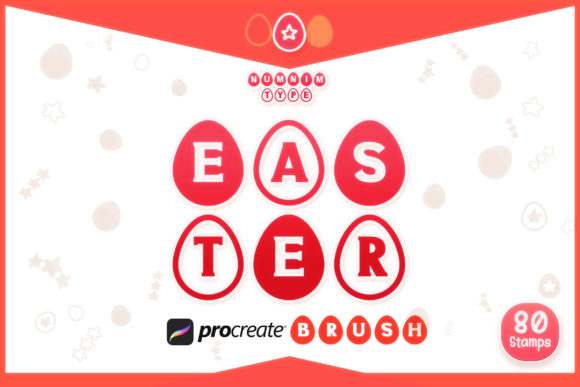
Digital illustration has evolved to offer specialized tools that streamline creative workflows, particularly for seasonal and thematic projects. Among these resources, the Procreate Brush Easter Rabbit Alphabet stands out as a niche asset designed for artists working within the Procreate ecosystem on iPad. This brush set is not merely a collection of standard typefaces but a curated library of stamp-style brushes featuring alphabetic characters, numerals, and decorative doodles, all rendered in a distinct Easter-themed aesthetic. For designers, illustrators, and hobbyists evaluating whether this tool aligns with their project requirements, understanding its specific capabilities, limitations, and ideal use cases is essential.
Understanding the Asset Composition
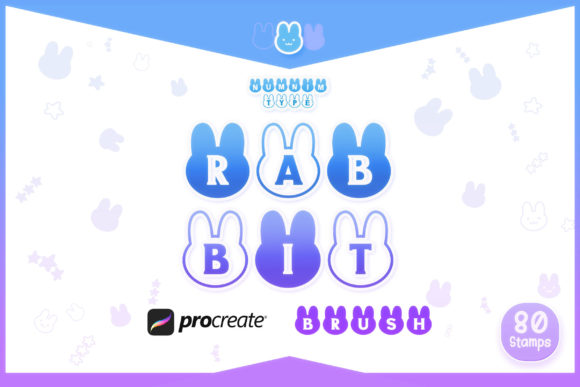
The core value of the Procreate Brush Easter Rabbit Alphabet lies in its comprehensive yet focused content structure. The package is delivered as a single zipped file containing a Procreate-specific brush set. Upon installation, users gain access to three primary categories of stamps:
- Alphabet Style 1: A complete set of 26 uppercase letters (A–Z) designed with a specific hand-drawn or thematic flair consistent with the Easter motif.
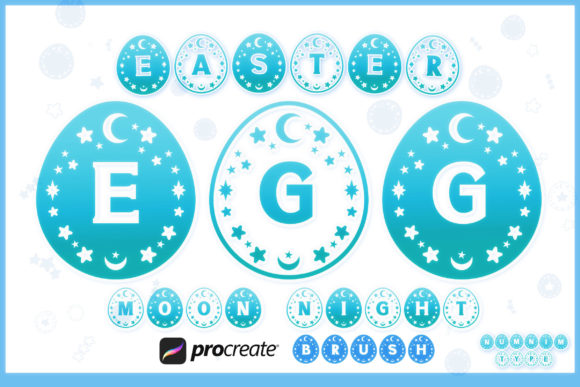
- Alphabet Style 2: An alternative set of 26 uppercase letters (A–Z), offering variation in weight, texture, or character design to provide visual diversity.
- Numerals: Numbers 0 through 9, available in two distinct styles, allowing for consistent typographic pairing when dates or quantities are needed in a design.
- Doodles: Supplementary decorative elements that complement the lettering, enhancing the thematic cohesion of illustrations.
It is important to note that while this product is optimized for Procreate, the underlying designs are also available in Font and SVG formats via the Numnim Type Store. This distinction is crucial for users who may need cross-platform compatibility or vector scalability outside of the iPad environment.
Why Consider Stamp-Style Brushes?
Artists often debate the utility of stamp brushes versus traditional text tools or hand-lettering. The Procreate Brush Easter Rabbit Alphabet addresses specific workflow efficiencies. Hand-lettering every character in a complex composition can be time-consuming and requires a high level of typographic skill to maintain consistency. Standard system fonts, while efficient, often lack the organic, hand-crafted feel that digital audiences increasingly appreciate in seasonal content.
Stamp brushes bridge this gap. They allow users to place pre-designed characters instantly, ensuring uniform style and spacing without the manual effort of drawing each letter. For projects with tight deadlines, such as social media content for Easter holidays, greeting cards, or digital stickers, this efficiency is a significant benefit. The inclusion of two alphabet styles further mitigates the risk of monotony, enabling designers to mix weights or textures for emphasis without leaving the app.
Evaluating Benefits and Tradeoffs
When assessing the Procreate Brush Easter Rabbit Alphabet, it is vital to weigh its advantages against its inherent limitations. The primary benefit is speed and thematic consistency. The brushes are engineered to work seamlessly with Procreate’s engine, meaning they respond to pressure and tilt settings if configured, though stamp brushes typically rely on single-tap placement. This makes them accessible to beginners who may struggle with vector paths or advanced typography settings.
However, there are tradeoffs. As stamp brushes, these characters are raster-based within the Procreate environment. Unlike SVG files, which remain infinitely scalable without quality loss, raster stamps can pixelate if scaled up excessively beyond their original resolution. Users must be mindful of canvas size and resolution when starting their projects to ensure the letters remain crisp. Additionally, while the set includes numbers and doodles, it does not replace a full-featured font manager. If a project requires lowercase letters, punctuation marks, or special characters not included in the set, users will need to supplement with other tools.
Ideal Use Cases
This brush set is a strong fit for several specific scenarios:
- Seasonal Social Media Graphics: Creating quick, engaging posts for Instagram or Pinterest during the Easter season where a playful, hand-drawn look is preferred over corporate typography.
- Digital Sticker Sheets: Designers selling digital planner stickers can use these brushes to create cohesive alphabet sets for users to customize their planners.
- Greeting Card Design: For independent creators making digital or print-on-demand cards, the integrated doodles and matching numerals allow for rapid composition of festive messages.
- Educational Materials: Teachers or parents creating digital worksheets for children may find the playful style engaging for learning activities.
In these contexts, the Procreate Brush Easter Rabbit Alphabet reduces production time while maintaining a high level of artistic integrity.
When to Consider Alternatives
Despite its utility, this tool may not be the best choice for every project. If your work requires precise typographic control, such as kerning adjustments between specific letter pairs or the use of extensive punctuation, a dedicated font file (OTF/TTF) might be more appropriate. Similarly, if you are designing large-format print materials like banners or billboards, the vector-based SVG versions available from Numnim Type Store would be a safer investment to ensure resolution independence.
Furthermore, artists who prefer complete creative control over every stroke may find stamp brushes restrictive. If your goal is to develop a unique hand-lettering style, relying on pre-made stamps could hinder skill development. In such cases, using the brushes as a reference or underlay for tracing might be a more beneficial approach than direct usage.
Making an Informed Decision
Choosing the right digital assets depends on your workflow and end goals. The Procreate Brush Easter Rabbit Alphabet is a specialized tool rather than a general-purpose solution. It excels in environments where speed, thematic relevance, and ease of use are prioritized. Before purchasing or downloading, consider your typical project scope. Do you frequently create seasonal content? Do you work primarily on iPad within Procreate? If the answer is yes, this set offers tangible value.
For those who require flexibility across multiple software platforms, remember that the same designs are available as fonts and SVGs. Evaluating your technical needs—raster vs. vector, app-specific vs. universal compatibility—will help determine whether the Procreate brush format is the most efficient choice for your current toolkit. By understanding both the creative potential and the technical constraints of stamp brushes, you can integrate the Procreate Brush Easter Rabbit Alphabet effectively into your digital art practice.