Transforming Digital Memories with the Watercolor Painting Photo Effect
There is a distinct charm to watercolor art that digital photography often struggles to replicate. The soft bleed of pigments, the organic texture of paper, and the dreamy, imperfect edges create an emotional resonance that sharp, high-definition images sometimes lack. This is where the Watercolor Painting Photo Effect becomes an invaluable tool for modern creators. It bridges the gap between the precision of digital capture and the soulful imperfection of traditional media. Whether you are a professional graphic designer looking to speed up your workflow or a hobbyist wanting to turn a family snapshot into wall art, understanding how to leverage this effect can significantly elevate your visual storytelling.
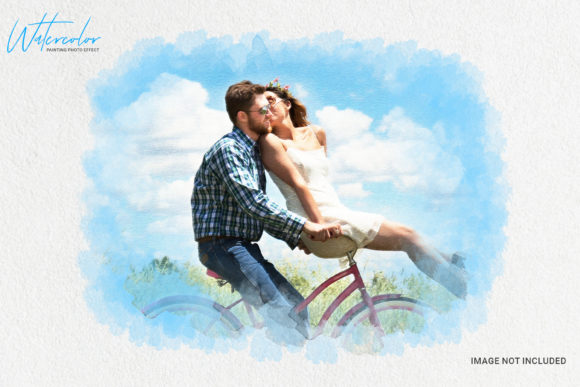
The appeal lies not just in the aesthetic but in the accessibility. In the past, achieving a convincing watercolor look required hours of manual painting or complex, multi-layered digital manipulation. Today, tools like the This is Watercolor Photo Effect Template have democratized this artistic style. By utilizing clean actions and smart object layers, users can achieve gallery-quality results in minutes rather than days. But beyond the technical ease, the real value comes from knowing when and why to apply this specific style to your images.
Why Choose a Watercolor Aesthetic?
Visual communication is about more than just showing what something looks like; it is about conveying how it feels. A standard photograph documents reality, but a watercolor interpretation invites the viewer to imagine. This stylistic choice softens harsh realities, removes distracting background clutter, and focuses attention on the subject’s essence. For marketers and bloggers, this can be the difference between a user scrolling past an image and stopping to engage with the content.
Consider the psychological impact. Watercolors are associated with calmness, nostalgia, and creativity. When you apply a Watercolor Painting Photo Effect to a product image, it suggests craftsmanship and care. When applied to a portrait, it adds a layer of intimacy and timelessness. This is particularly useful in industries where trust and emotional connection are paramount, such as wedding photography, wellness coaching, or artisanal product sales.
Practical Use Cases Across Industries
The versatility of this effect means it fits seamlessly into various professional and personal scenarios. Here is how different users can benefit from integrating this template into their workflow.
For Entrepreneurs and Small Business Owners
If you run a boutique shop, a bakery, or a handmade jewelry business, your brand identity needs to stand out in a crowded social media feed. Standard product photos can look sterile. By using a watercolor effect, you can create a cohesive, artistic brand aesthetic. Imagine a photo of a hand-knitted scarf overlaid with soft watercolor textures. It emphasizes the tactile nature of the product and aligns with a "handcrafted" brand narrative. This approach helps small businesses compete with larger corporations by offering a unique, personalized visual experience that feels authentic rather than mass-produced.
For Wedding and Event Photographers
Couples often want their wedding albums to feel like storybooks. While high-resolution candid shots are essential, offering a selection of images processed with a Watercolor Painting Photo Effect adds significant value to your packages. These edited images work beautifully for save-the-date cards, wedding websites, and large canvas prints for the home. The softening effect romanticizes the moment, making it feel like a cherished memory rather than just a record of an event. It allows photographers to offer a premium upsell service without spending hours manually editing each pixel.
For Content Creators and Bloggers
In the world of lifestyle blogging, consistency is key. If your niche involves mindfulness, travel, or interior design, a watercolor style can serve as a signature visual element. You can use these effects for featured images, Pinterest pins, or Instagram stories. For example, a travel blogger might use a watercolor effect on a landscape photo to evoke a sense of dreamy wanderlust. This distinguishes their content from the thousands of other travel blogs using standard filters. It creates a recognizable brand identity that followers associate with a specific mood or feeling.
For Educators and Publishers
Educational materials often suffer from being visually dry. Teachers and publishers can use watercolor effects to make historical figures, scientific diagrams, or literary characters more engaging. A textbook illustration of a botanical specimen rendered in watercolor style is not only aesthetically pleasing but also historically accurate to the style of scientific illustration from previous centuries. This adds an layer of educational context while keeping the material visually appealing for students of all ages.
Understanding the Technical Advantages
While the artistic outcome is the primary goal, the technical foundation of the tool you choose matters immensely. A high-quality template, such as the one described with clean actions and smart object layers, ensures that the final result is professional and flexible. Here is why these features are critical for real-world application:
- Smart Object Layers: This feature allows you to replace the placeholder image with your own photo easily. Because it is non-destructive, you can swap images in and out without losing the effect settings. This is crucial for batch processing or when testing different photos to see which one works best with the watercolor style.
- Fully Editable Parameters: Not every photo reacts the same way to a filter. A good template allows you to adjust the intensity of the watercolor bleed, the saturation, and the contrast. This means you retain creative control. You can dial back the effect for a subtle touch or push it further for a more abstract, painterly look.
- High Resolution (300 DPI): Many free online filters compress images, making them suitable only for web use. However, if you intend to print your artwork on canvas, greeting cards, or merchandise, you need a resolution of 300 DPI. A professional Photoshop file ensures that the details remain crisp even when enlarged, maintaining the quality required for commercial printing.
- Well-Organized Structure: Time is money. A messy file with unnamed layers can turn a five-minute task into an hour-long frustration. A well-organized template with clear labels allows you to navigate the file quickly, making it efficient for professionals who need to deliver results under tight deadlines.
Choosing the Right Image for the Effect
Not every photograph translates well into a watercolor painting. To get the best results from your Watercolor Painting Photo Effect, consider the source material. Images with strong contrasts and clear subjects tend to work best. Portraits with good lighting, landscapes with distinct horizons, and still-life compositions with defined shapes will yield the most convincing results.
Avoid images that are too busy or cluttered. The watercolor effect simplifies details, so if the original photo has too much noise, the result may look muddy rather than artistic. Also, consider the color palette. Watercolors thrive on transparency and flow. Images with vibrant, complementary colors often produce more dynamic and eye-catching results than those with muted, monochromatic tones, although the latter can create a sophisticated, minimalist vibe if handled correctly.
When you run the first action on your photo, take a moment to evaluate the output. Does it capture the mood you intended? If not, use the editable layers to tweak the balance. The beauty of using a template like This is Watercolor Photo Effect Template is that it provides a strong starting point, but your artistic judgment finishes the job. It is a collaboration between automated efficiency and human creativity.
Ultimately, integrating a watercolor effect into your visual toolkit is about expanding your expressive range. It allows you to step away from the literal interpretation of photography and move toward something more evocative and emotional. Whether you are selling a product, telling a story, or preserving a memory, this effect offers a timeless elegance that resonates with viewers on a deeper level. By choosing a high-quality, editable, and high-resolution template, you ensure that your creative vision is executed with professionalism and ease, leaving you more time to focus on what truly matters: connecting with your audience.