Unlocking Creative Efficiency with the Sprinkles Procreate Stamp Brush
Digital illustration offers boundless possibilities, yet even the most skilled artists often find themselves bogged down by repetitive tasks. Adding texture, creating organic patterns, or scattering small elements across a canvas can consume hours of meticulous work. This is where specialized tools become not just a luxury, but a necessity for maintaining creative flow. The Sprinkles Procreate Stamp Brush emerges as a targeted solution for this common bottleneck, offering a streamlined way to introduce complex visual interest without the manual labor. Designed specifically for the Procreate ecosystem on iPad, this tool transforms how artists approach texture and detail, allowing them to focus more on composition and less on tedious repetition.
The Challenge of Manual Texturing in Digital Art
For many digital artists, the desire to add depth and realism to their work often leads to the "texture trap." Whether you are illustrating children’s books, designing social media graphics, or creating concept art, adding subtle details like confetti, dust, snow, or organic speckles is crucial for breaking up flat colors. However, painting these elements one by one is inefficient. Using standard scatter brushes can sometimes result in unnatural uniformity or a lack of control over the placement and size of individual elements. Artists frequently struggle to find a balance between speed and aesthetic precision, often sacrificing one for the other.
This friction disrupts the creative process. When an artist spends twenty minutes manually placing tiny dots to simulate a starry sky or sprinkling sugar on a pastry illustration, the momentum of the piece stalls. The need arises for a tool that acts as a force multiplier—something that can generate varied, natural-looking results with a single stroke or tap. This is precisely the gap that the Sprinkles Procreate Stamp Brush fills, providing a handmade, curated experience that feels organic rather than algorithmic.
What Is the Sprinkles Procreate Stamp Brush?
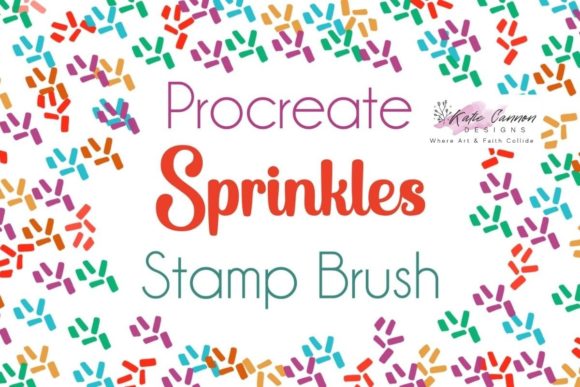
At its core, the Sprinkles Procreate Stamp Brush is a custom-created digital asset designed to function within the Procreate app on iPad. Unlike generic brushes that rely solely on software-generated randomness, this is a handmade stamp brush. This distinction is vital. Handmade stamps are crafted with artistic intent, ensuring that each "sprinkle" or texture element has character, variation, and a human touch. It is not just a random noise generator; it is a curated collection of shapes that mimic real-world textures.
This listing provides one specific Procreate Stamp Brush file. It is engineered to work seamlessly on most iPad Pro versions, ensuring that whether you are using an older model or the latest release, the performance remains smooth and responsive. The primary goal of this brush is to allow users to add quick texture to their artworks. By leveraging the stamp functionality, artists can place pre-designed elements instantly, adjusting their scale and opacity to suit the specific needs of the illustration.
Practical Applications and Creative Outcomes
The versatility of the Sprinkles Procreate Stamp Brush extends across various artistic disciplines. For illustrators working in food photography or culinary illustration, this brush can simulate sesame seeds, powdered sugar, or herb garnishes with remarkable speed. Instead of painting each seed individually, the artist can stamp clusters of texture, then use the eraser or transform tools to refine the placement. This method preserves the organic feel of hand-drawn details while drastically reducing production time.
In the realm of graphic design and pattern making, the brush serves as an excellent starting point for creating seamless backgrounds. Designers can use the stamp to lay down a base layer of texture, which can then be blurred, colored, or layered with other elements to create unique wallpapers, wrapping paper designs, or textile prints. The handmade nature of the stamp ensures that the resulting patterns do not look overly digital or sterile, maintaining a warm, artisanal quality that is highly valued in modern design trends.
Concept artists and environment designers also benefit significantly from this tool. When sketching out landscapes, adding foliage, rocks, or debris can be time-consuming. The Sprinkles Procreate Stamp Brush allows for rapid iteration of these elements. An artist can quickly test different densities of ground cover or atmospheric particles, such as rain or snow, to see what best suits the mood of the scene. This rapid prototyping capability enables faster decision-making and a more dynamic workflow.
Technical Requirements and Installation Guide
To utilize the Sprinkles Procreate Stamp Brush, users must have the Procreate app installed on their iPad. It is important to note that this is a digital download, typically delivered as a compressed ZIP file. Many users, particularly those new to digital assets, may find the installation process slightly confusing if they are unfamiliar with handling ZIP files on iOS. Therefore, understanding the correct workflow is essential for a smooth experience.
The first step is to ensure you have a way to unzip the file. On modern iPads, the built-in Files app handles this effortlessly. Once the download is complete, locate the ZIP file in your Downloads folder within the Files app. Tapping on the file will automatically extract its contents, revealing the actual brush file, which usually ends in the extension .brush or .brushset. If you are using an older iOS version or a third-party file manager, ensure that your app supports unzipping archives before proceeding.
After extracting the file, loading it into Procreate is straightforward. Open the Procreate app and navigate to the Brush Library by tapping the brush icon in the top right corner. Tap on any category, such as "Sketching" or "Calligraphy," to open the list of brushes. Then, simply drag and drop the extracted brush file from the Files app directly into the Procreate brush list. Alternatively, you can tap the plus sign in the top right corner of the Brush Library and select "Import" to locate the file. Once imported, the Sprinkles Procreate Stamp Brush is ready to use immediately.
Tailoring the Tool to Your Workflow
Different users will approach the Sprinkles Procreate Stamp Brush in unique ways, depending on their style and objectives. A minimalist designer might use it sparingly, adding just a few subtle specks to break up large areas of negative space. In contrast, a maximalist illustrator might layer multiple stamps with varying opacities and blend modes to create rich, complex textures. The key is experimentation. Users are encouraged to adjust the brush settings within Procreate, such as size jitter, opacity, and spacing, to customize the output further.
For beginners, the recommendation is to start with simple projects. Try using the brush on a blank canvas to understand how the stamp behaves. Experiment with different pressures if your Apple Pencil supports it, although stamp brushes often respond differently than standard drawing brushes. Notice how the handmade quality of the stamp adds variation that pure digital randomness cannot replicate. For advanced users, consider combining this brush with masking layers. By stamping onto a mask, you can control exactly where the texture appears, allowing for precise integration into complex compositions.
Ultimately, the value of the Sprinkles Procreate Stamp Brush lies in its ability to enhance productivity without compromising artistic integrity. It addresses the practical need for speed and texture, offering a reliable, high-quality solution for iPad artists. By integrating this tool into your digital toolkit, you free up valuable time to focus on the broader aspects of your art, such as storytelling, color theory, and composition, while still achieving the detailed, textured look that brings illustrations to life.