Unlocking Digital Joy: A Complete Guide to Using Celebration Brush Stamps in Procreate
In the rapidly evolving world of digital art, efficiency and expression often walk hand in hand. For artists, designers, and hobbyists using the iPad, Procreate has become the industry standard for illustration. However, creating intricate details from scratch can be time-consuming. This is where specialized tools like Celebration Brush Stamps come into play. These digital assets are not just shortcuts; they are creative catalysts that allow users to infuse their work with festive energy instantly.
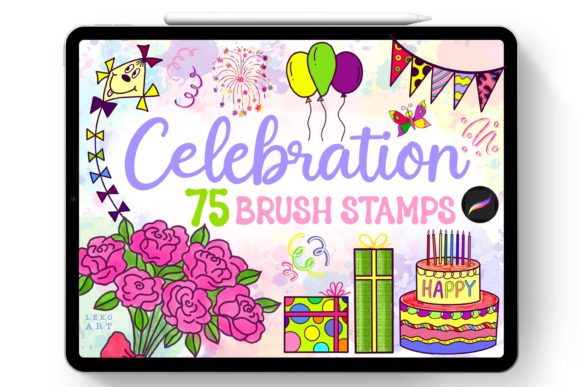
If you have recently acquired a set of 75 Celebration doodles brush stamps, you might be wondering how to best integrate them into your workflow. This guide will walk you through the purpose of these tools, how to install them correctly, and why they are significant for modern digital creativity. Whether you are designing party invitations, social media graphics, or personal journal entries, understanding these brushes will elevate your artistic output.
What Are Celebration Brush Stamps?
At their core, brush stamps are pre-designed shapes or illustrations that function as a single brush stroke. Unlike traditional brushes that paint continuous lines, stamp brushes place a complete image—such as a balloon, confetti, cake, or ribbon—onto your canvas with every tap. The Celebration set specifically focuses on themes of joy, parties, and milestones.
The significance of this tool lies in its ability to bridge the gap between professional design quality and amateur speed. In traditional graphic design software, adding seventy-five unique decorative elements might require importing individual PNG files, resizing them, and adjusting their opacity manually. With Procreate brush stamps, this process is reduced to a single gesture. This efficiency is crucial for creators who need to produce high volumes of content, such as social media managers or small business owners creating marketing materials.
The Practical Relevance in Modern Creativity
We live in a visual-first era. From Instagram stories to digital planners, the demand for engaging, festive visuals is higher than ever. Using a dedicated Celebration.brushset allows you to maintain a consistent aesthetic without spending hours drawing repetitive elements. It fits seamlessly into various aspects of modern life:
- Small Business Branding: Quickly add festive touches to product photos or sale announcements.
- Digital Planning: Enhance GoodNotes or Notability journals with cute, thematic stickers.
- Greeting Cards: Create personalized, hand-drawn style cards for birthdays and holidays.
- Educational Materials: Teachers can use these stamps to make worksheets more engaging for students.
Understanding Compatibility and Requirements
Before diving into the creative process, it is vital to address a common misunderstanding regarding digital brushes. Many beginners assume that brush files are universal across all painting applications. This is not the case.
The Celebration Brush Stamps are engineered specifically for the Procreate app. They will not work in other painting programs such as Photoshop, Clip Studio Paint, or Adobe Fresco. Procreate uses a proprietary file format (.brushset) that encapsulates complex data about shape, grain, spacing, and dynamics. Attempting to use these files in other software will result in errors or unsupported file messages.
Furthermore, these brushes are designed for use on the iPad. While Procreate exists on iPhone and Mac, the primary workflow and file management system described here are optimized for the iPad experience. Ensuring you have the latest version of Procreate installed will guarantee the smoothest performance and access to all brush settings.
Step-by-Step Installation Guide
Installing custom brushes in Procreate is straightforward, but doing it correctly ensures that your library remains organized. Here is how to get your 75 Celebration doodles ready for use:
- Download the File: After purchasing or acquiring the asset, you will receive a single zip file containing the
Celebration.brushset. - Locate the File: Open the "Files" app on your iPad. Navigate to the folder where the download was saved (usually the "Downloads" folder).
- Tap to Import: Tap on the
Celebration.brushsetfile. Your iPad should recognize the file type. - Automatic Import: Procreate will automatically launch (or switch to the foreground) and import the entire set. You do not need to unzip the file manually; Procreate handles this process internally.
- Verify Installation: Open Procreate and tap on the Brush Library icon. Scroll through your brush sets. You should see a new folder named "Celebration" containing your 75 new stamps.
Note: If the brushes do not appear immediately, try restarting the Procreate app. Occasionally, a refresh is needed to update the library view.
Maximizing Your Creative Workflow
Now that your brushes are installed, how do you use them effectively? The beauty of stamp brushes is their versatility. Here are three ways to integrate them into your projects:
1. Layering for Depth
Do not just place a stamp and leave it. Use multiple layers to create depth. For example, place a "confetti" stamp on one layer, lower its opacity, and then place a "balloon" stamp on a layer above it. This creates a sense of three-dimensional space and makes the composition feel more dynamic.
2. Color Customization
Most Procreate brushes, including these celebration stamps, respect your current color selection. This means you can change the color of a cake or a ribbon instantly by selecting a new hue from the color disc before stamping. This feature allows you to match the stamps to any brand palette or theme without needing external editing tools.
3. Combining with Hand-Lettering
These doodles are perfect companions for hand-lettered quotes. Write a phrase like "Happy Birthday" or "Congratulations," and use the celebration stamps to frame the text. The organic, hand-drawn look of the stamps complements the imperfections of handwritten text, creating a cohesive and authentic aesthetic.
Common Misconceptions Clarified
As you explore these tools, you may encounter some confusion. Let’s clarify a few points:
- "Are these static images?" No, while they are pre-made shapes, they behave like brushes. You can adjust their size, rotation, and spacing within the Brush Studio if you wish to customize their behavior further.
- "Can I use these for commercial projects?" Generally, yes, but always check the specific license agreement provided by the creator. Most individual artists allow commercial use for end-products (like printed cards) but prohibit reselling the brush file itself.
- "Do I need an Apple Pencil?" While an Apple Pencil offers precision, you can use these stamp brushes with your finger. Since they are stamps rather than pressure-sensitive shading brushes, finger tapping works perfectly well for quick placements.
Why Subscribe for More Designs?
Digital art trends change rapidly. What is popular today may evolve tomorrow. By subscribing to the creator, you ensure that you stay ahead of the curve. New designs often reflect seasonal trends, emerging aesthetics, and user feedback. Subscribing is not just about getting more files; it is about joining a community of creators who value efficiency and beauty.
Moreover, regular updates mean you will have a fresh library of assets to keep your portfolio diverse. Whether it is holiday-specific stamps or new everyday doodles, staying connected with the designer ensures you never run out of creative inspiration.
Conclusion
The Celebration Brush Stamps for Procreate represent more than just a collection of 75 doodles; they are a toolkit for efficient, joyful creation. By understanding their compatibility, mastering the installation process, and experimenting with layering and color, you can significantly enhance your digital art workflow. Remember, these tools are exclusive to Procreate on the iPad, so make sure you are working within the right ecosystem.
Whether you are a beginner looking to add some flair to your first digital drawing or an experienced designer seeking to speed up your production, these brushes offer immense value. Embrace the convenience, explore the creative possibilities, and let your digital celebrations begin. For more resources and future updates, consider subscribing to the designer to keep your creative arsenal stocked with the latest and greatest tools.