Art Journaling with Procreate Set: A Guide to Digital Sketchbooks
The landscape of digital creativity has shifted dramatically in recent years, moving from static single-canvas workflows to dynamic, multi-page environments. For artists, illustrators, and hobbyists alike, the ability to organize thoughts, sketches, and finished pieces into a cohesive narrative is invaluable. This is where the concept of a digital sketchbook comes into play, transforming how we approach art journaling on tablets. With the introduction of advanced features in popular drawing applications, creating a structured, book-like experience is no longer a workaround but a native capability.
In this exploration, we delve into the utility and design philosophy behind the Art Journaling with Procreate Set. This collection is not merely a bundle of assets; it is a structural framework designed to leverage the latest page management tools within the software. By understanding how these digital journals function, creators can streamline their workflow, enhance their organizational habits, and find new joy in the act of daily sketching.
The Evolution of Digital Page Management
For years, digital artists faced a significant limitation: managing multiple pages required creating separate files for each sheet of paper. This fragmented workflow made it difficult to view a project as a whole, especially for comics, storyboards, or traditional journaling. The introduction of the ‘page assist’ feature changed this paradigm. It allows users to house several pages within a single file, mimicking the physical experience of flipping through a notebook.
The Art Journaling with Procreate Set was developed specifically to capitalize on this technological leap. Rather than starting from a blank void, users are provided with a pre-structured environment that feels familiar and inviting. The set acknowledges that while technology provides the tools, the human desire for tactile familiarity remains strong. By simulating the look and feel of physical journals, these digital templates bridge the gap between traditional media and modern convenience.
Why Structure Matters in Creative Work
Many artists struggle with the "blank canvas syndrome." When faced with an infinite white space, the pressure to create something perfect can be paralyzing. A structured journal offers boundaries. It defines the space, suggesting that what goes inside is part of a larger, ongoing process rather than a standalone masterpiece. This psychological shift encourages experimentation and consistency.
- Organization: Keeps sketches, notes, and ideas in one searchable location.
- Continuity: Allows for visual storytelling across multiple pages without file switching.
- Portability: Carries an entire library of work in a single device, ideal for travel.
Exploring the Art Journaling with Procreate Set Features
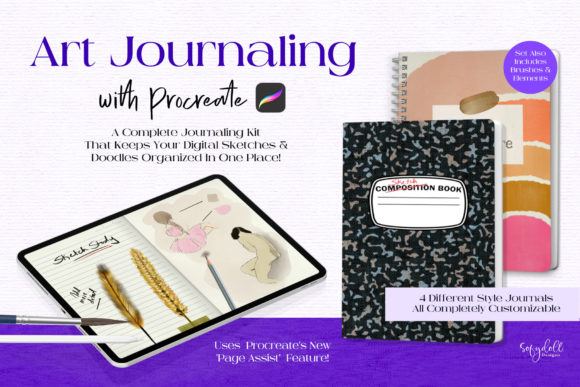
The core value of this set lies in its versatility and attention to detail. It includes four distinct styles of digital journals, catering to different aesthetic preferences and functional needs. Two of the journals feature a stitched binding style, evoking the feel of hand-bound leather notebooks. The other two utilize a coil binder style, reminiscent of standard spiral-bound sketchpads. This variety ensures that users can select a visual theme that resonates with their personal brand or creative mood.
Each element within these journals is placed on a separate layer. This is a critical technical detail that empowers customization. Users are not stuck with a static background. The textures, backgrounds, and binder rings can be toggled, hidden, or replaced entirely. For instance, if a user prefers a clean, minimal look, they can hide the texture layers. If they want a grunge aesthetic, they can swap in their own paper textures. This modularity makes the Art Journaling with Procreate Set a flexible tool rather than a rigid template.
Dimensions and Format Specifications
Standardization is key to a smooth workflow. Each journal in the pack is formatted at 8.5″ x 11″ in landscape orientation. This size is widely recognized and prints easily if physical copies are ever needed. The landscape format is particularly beneficial for digital devices, as it maximizes screen real estate on most tablets when held horizontally.
Every journal file includes a dedicated ‘cover’ page and four ‘inside pages.’ However, the structure is not limiting. Thanks to the page assist feature, users can duplicate these pages indefinitely. Need a fifty-page comic? Simply duplicate the interior pages. Want a quick five-page storyboard? Delete the extras. This scalability ensures the tool grows with the project.
Practical Applications for Creators
Who benefits most from a structured digital journaling system? The answer is broader than one might expect. While illustrators are the obvious primary audience, the utility extends to various professional and personal contexts.
- Comic Artists and Storyboarders: The multi-page functionality allows for sequential art creation without losing context. Artists can sketch thumbnails on one page and refine them on the next, keeping the narrative flow intact.
- UX/UI Designers: Wireframing often requires multiple screens. Using a journal format helps organize user flows and interface iterations in a linear, easy-to-review manner.
- Students and Educators: Visual note-taking becomes more effective when organized into chapters or subjects. The ability to add text and images on separate layers facilitates clear, annotated study guides.
- Hobbyists and Travelers: For those who document their journeys, a digital journal eliminates the need to carry heavy supplies. Photos can be imported directly onto the pages, mixed with hand-drawn elements and handwritten notes.
Enhancing Visual Appeal with Extras
Beyond the journal structures, the pack includes ten journal ‘sticker’ elements. These digital assets serve as decorative accents that add flair and personality to the pages. They can be used to highlight important notes, mark dates, or simply add visual interest to sparse layouts. Because these are separate elements, they can be resized, rotated, and recolored to match the specific tone of each entry.
The inclusion of these extras underscores the philosophy behind the Art Journaling with Procreate Set: it is meant to be played with. Digital art should not feel sterile. By providing tangible-looking elements like stitches, rings, and stickers, the set invites users to engage with their work on a sensory level, even if that engagement is virtual.
Evaluating Suitability for Your Workflow
Before integrating any new tool into your creative routine, it is essential to assess its fit. The Art Journaling with Procreate Set is ideal for those who value organization and aesthetic consistency. If you prefer a chaotic, free-form approach where every file is unique and unrelated, this structured system might feel restrictive. However, for most creators, the benefits of having a unified workspace outweigh the constraints of a template.
Consider your hardware capabilities as well. While Procreate is optimized for performance, multi-page files with high-resolution textures can consume more memory. Users with older tablet models may need to manage layer counts carefully. The set’s design, with interchangeable layers, helps mitigate this by allowing users to simplify the file if necessary.
Getting Started: Tips for Success
To maximize the value of this set, start by customizing the master file. Spend time adjusting the colors and textures to suit your visual preference. Once you have a base template you love, save it as a default. This reduces setup time for future projects.
Additionally, experiment with the layer hierarchy. Keep your sketch layers separate from your ink and color layers. This non-destructive workflow allows for easy edits later. Use the cover page not just as a title card, but as a table of contents if your journal becomes extensive. Linking pages mentally or visually can help navigate larger documents.
Conclusion
The transition to digital art does not require abandoning the cherished rituals of traditional journaling. Instead, it offers an opportunity to enhance them with flexibility and power. The Art Journaling with Procreate Set provides a robust foundation for this hybrid approach. By combining the organizational benefits of multi-page files with the aesthetic charm of physical notebooks, it creates a space where creativity can thrive without clutter.
Whether you are designing a graphic novel, planning a business project, or simply documenting your daily thoughts, this set offers the structure needed to bring order to chaos. It reminds us that tools are only as good as the intent behind them. With the right framework, digital sketching becomes not just a task, but a joyful, sustainable practice. As technology continues to evolve, resources like this ensure that artists remain at the forefront, leveraging new features to express old souls in new ways.