Mastering the Acrylic Calligraphy Procreate Brush
Digital lettering has evolved significantly over the past decade, moving from rigid vector lines to organic, textured strokes that mimic traditional media. Among the many tools available to modern creators, the Acrylic Calligraphy Procreate Brush stands out as a specialized instrument designed to bridge the gap between digital precision and the messy, beautiful unpredictability of paint. For illustrators, hand-letterers, and graphic designers working within the iPad ecosystem, this tool offers a unique way to inject personality and depth into their work without the cleanup required by physical acrylics.
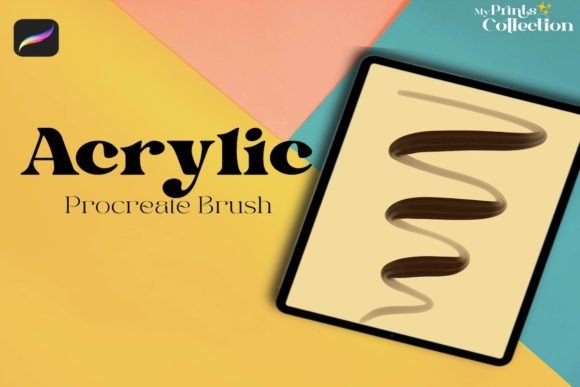
The core appeal of this brush lies in its ability to simulate the viscosity and texture of real acrylic paint. Unlike standard digital brushes that often feel too smooth or uniform, an acrylic simulation introduces subtle imperfections—dry edges, pigment pooling, and bristle marks—that make digital art feel tangible. When you use the Acrylic Single Brush, you are not just drawing a line; you are laying down color with weight and presence. This distinction is crucial for professionals who need their digital assets to stand out in a saturated market where authenticity is highly valued.
Why Texture Matters in Digital Lettering
In the world of branding and social media content, clean and sterile designs often fail to capture attention. Audiences are drawn to visuals that feel human-made. The Acrylic Calligraphy Procreate Brush addresses this by providing a tactile quality that flat colors cannot achieve. Whether you are designing a logo for a boutique coffee shop or creating Instagram stories for a lifestyle brand, the textured stroke adds a layer of sophistication and warmth.
This brush is particularly effective for calligraphy because it responds dynamically to pressure and tilt. As you press harder, the stroke widens and the texture becomes more pronounced, mimicking how a real brush loads with paint. When you lift lightly, the line thins, revealing the paper texture underneath. This responsiveness allows for a high degree of control, enabling artists to create elegant swashes and bold downstrokes within the same word. It transforms simple text into visual art, making it an invaluable asset for anyone looking to elevate their typographic projects.
Key Characteristics and Technical Strengths
Understanding what makes this tool effective requires looking at its technical construction. The Acrylic Single Brush is engineered to balance performance with aesthetic quality. Here are the notable qualities that define its utility:
- Authentic Texture Mapping: The brush uses complex noise patterns to replicate the granular look of acrylic pigment on canvas or watercolor paper.
- Pressure Sensitivity Optimization: It is calibrated for Apple Pencil input, ensuring that every nuance of your hand movement is translated into the stroke width and opacity.
- Single-File Simplicity: Included as a single
.brushsetfile, it integrates seamlessly into your existing library without cluttering your workspace with dozens of unused variants. - Layer Blending Compatibility: The brush works exceptionally well with Multiply and Overlay blend modes, allowing for realistic color mixing and shadowing effects directly on the canvas.
It is important to note the software requirements. This tool is built exclusively for the Procreate App version 5 or higher. It is not compatible with Photoshop, Illustrator, or other desktop-based design software. This specialization ensures that the brush leverages the specific engine capabilities of Procreate, resulting in smoother performance and more accurate rendering on iPad devices.
Practical Applications Across Industries
The versatility of the Acrylic Calligraphy Procreate Brush extends beyond personal hobby projects. Professionals across various sectors can leverage this tool to enhance their output and streamline their creative workflows.
Branding and Marketing
For marketers and entrepreneurs, custom typography is a powerful differentiator. Using this brush, you can create unique logotypes, packaging designs, and promotional materials that feel bespoke. Imagine a skincare brand using textured, handwritten labels to convey natural ingredients and artisanal quality. The acrylic effect suggests craftsmanship, which can significantly boost consumer trust and engagement.
Education and Content Creation
Educators and bloggers can use this brush to create engaging visual aids. Hand-lettered quotes, highlighted key terms, and decorative headers break up text-heavy content, making it more digestible and visually appealing. The organic look helps maintain a friendly, approachable tone, which is essential for building community in online courses or newsletters.
Commercial Illustration
Freelance illustrators often face tight deadlines. The efficiency of digital tools combined with the aesthetic of traditional media allows for faster iteration. You can sketch, ink, and color in one environment without waiting for paint to dry. The Acrylic Single Brush is perfect for adding final details to illustrations, such as textured highlights on clothing, organic backgrounds, or hand-drawn elements that need to stand out against vector graphics.
Maximizing Efficiency and Workflow
To get the most out of the Acrylic Calligraphy Procreate Brush, consider integrating it into a layered workflow. Start with a rough sketch on a lower opacity layer. Then, create a new layer specifically for your calligraphy. This separation allows you to experiment with different colors and compositions without affecting your underlying artwork. Because the brush simulates opaque paint, you can easily cover mistakes or layer colors to create depth, much like you would on a physical canvas.
Another practical tip is to utilize the "StreamLine" feature in Procreate. While the brush captures the texture of acrylics, enabling StreamLine can help smooth out shaky hand movements, resulting in cleaner curves while retaining the textured edge. This combination of technological assistance and artistic texture is where digital tools truly shine, offering the best of both worlds.
Making the Right Choice for Your Toolkit
When evaluating whether this brush fits your needs, consider your current project types. If you primarily work with geometric shapes, technical diagrams, or corporate minimalism, a clean sans-serif font or a standard vector brush might be more appropriate. However, if your work involves storytelling, emotional connection, or organic themes, the Acrylic Calligraphy Procreate Brush is an essential addition. It saves time by eliminating the need to scan and clean up traditional paintings, yet it delivers the same visual impact.
Remember that mastery comes with practice. Spend time experimenting with pressure settings and canvas textures. Watch the included video tutorial to understand the nuances of the brush’s behavior. By understanding how the digital pigment interacts with the virtual surface, you can unlock new creative possibilities and produce work that resonates with your audience on a deeper level.
Ultimately, tools are only as good as the intent behind them. The Acrylic Single Brush provides the means to express creativity with authenticity and flair. Whether you are a seasoned professional or a passionate hobbyist, incorporating this tool into your digital arsenal can transform the way you approach lettering and illustration, adding a touch of handmade charm to your digital portfolio.