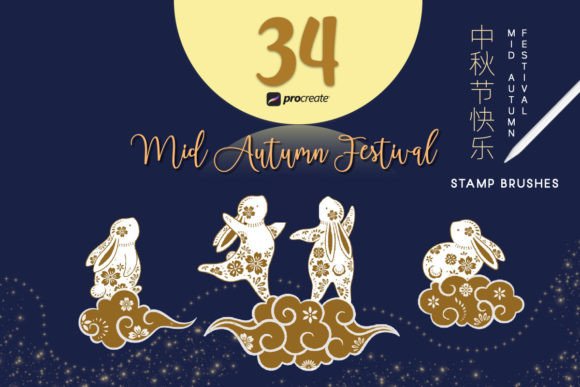
Mid Autumn Procreate Stamp Brush: Streamlining Seasonal Design Workflows
For digital artists, illustrators, and content creators, the transition between seasons often demands a rapid shift in visual assets. Whether you are designing social media graphics for a small business, creating educational materials for a classroom, or developing personal greeting cards, consistency and speed are paramount. The Mid Autumn Procreate Stamp Brush serves as a specialized tool designed to bridge the gap between conceptual ideation and final execution. By integrating pre-made, high-quality elements directly into your canvas, this resource allows you to focus on composition and storytelling rather than repetitive asset creation.
This article explores how to effectively incorporate these brushes into your existing creative pipeline, ensuring that your Mid-Autumn Festival projects are not only visually appealing but also produced with professional efficiency.
Understanding the Asset Composition
Before diving into implementation, it is crucial to understand what constitutes the Mid Autumn Festival Procreate Stamp Brush set. This collection is not merely a random assortment of images; it is a curated library of 34 distinct elements, specifically broken down into 16 rabbits and 18 complementary festival elements. These components include traditional motifs such as mooncakes, lanterns, osmanthus flowers, and lunar imagery.
The value of this set lies in its specificity. Generic brush sets often lack the cultural nuance required for authentic Mid-Autumn Festival designs. By using a dedicated set, you ensure that your work respects the thematic integrity of the holiday while maintaining a cohesive visual style. The rabbits, often symbolizing the Moon Rabbit in East Asian folklore, provide a central character element that can anchor various design layouts.
Pre-Production: Preparation and Organization
Successful integration of any digital asset begins before you open the app. To maximize the utility of the Mid Autumn Procreate Stamp Brush, consider the following preparatory steps:
- Palette Planning: Determine your color scheme early. While stamp brushes come with their own colors, Procreate allows for hue shifts. Decide if you want a traditional warm palette (golds, reds, deep blues) or a modern pastel interpretation. This decision will guide how you adjust the stamps later.
- Canvas Setup: Define your output dimensions. If you are creating Instagram stories, set up a vertical canvas. For printables like greeting cards, ensure your resolution is at least 300 DPI. High-resolution canvases ensure that the stamp details remain crisp when scaled.
- Layer Structure: Create a dedicated folder for your stamp layers. This organizational habit prevents clutter and makes it easier to apply global adjustments, such as opacity changes or blending modes, to all festive elements simultaneously.
Integration into the Creative Workflow
The Mid Autumn Festival Procreate Stamp Brush fits seamlessly into various stages of the design process. It is not limited to final embellishments; it can serve as a foundational building block for complex compositions.
Rapid Prototyping and Layout Testing
When starting a new project, time is often spent experimenting with composition. Instead of sketching every element from scratch, use the 16 rabbit stamps and 18 festival elements to block out your design. Drag and drop different rabbit poses to find the right focal point. Arrange lanterns and mooncakes to test balance and negative space. This method allows you to iterate quickly, testing multiple layout variations in minutes rather than hours.
Enhancing Hand-Drawn Illustrations
For artists who prefer a hybrid approach, these stamps complement hand-drawn backgrounds beautifully. You might paint a soft, atmospheric moonlit sky using standard Procreate brushes, then use the Mid Autumn Procreate Stamp Brush to add sharp, detailed foreground elements. This contrast between soft painterly backgrounds and crisp stamped foregrounds creates visual depth and interest. Use the eraser tool with a soft brush to blend the edges of the stamps, ensuring they sit naturally within the environment rather than appearing pasted on.
Commercial Content Creation
Marketers and small business owners often face tight deadlines during holiday seasons. Using this stamp set can significantly reduce turnaround time for promotional materials. Create a template for your brand’s Mid-Autumn posts by placing key elements in fixed positions. Simply swap out the specific rabbit or mooncake stamp for each new post to maintain brand consistency while keeping the content fresh. This workflow ensures that your social media presence remains active and relevant without requiring extensive design resources for each individual piece.
Technical Tips for Optimal Results
To get the most out of your Mid Autumn Procreate Stamp Brush, pay attention to technical settings and adjustments within the app.
- Color Adjustment: Tap on the stamp layer and select "Adjustments." Use the Hue, Saturation, and Brightness tool to match the stamps to your overall color scheme. This step is essential for maintaining visual harmony.
- Blending Modes: Experiment with blending modes such as Multiply for shadows or Screen for glowing effects on lanterns. This technique helps integrate the stamps into the lighting of your scene.
- Scaling and Rotation: Avoid using the same stamp orientation repeatedly. Rotate and flip the rabbits and elements to create dynamic movement. Varying the size of the stamps adds perspective, making larger elements appear closer and smaller ones further away.
- Texture Overlay: To unify the digital stamps with hand-painted elements, add a subtle noise or paper texture overlay on top of all layers. Set this layer to Overlay or Soft Light mode at low opacity. This trick reduces the "digital" look of the stamps and gives the entire piece a cohesive, tactile feel.
Quality Control and Consistency
When using pre-made assets, maintaining a high standard of quality is essential. Ensure that the resolution of your canvas matches the intended use case. For web-based content, RGB color mode is standard, but for print materials like invitations or packaging, switch to CMYK if your printer requires it, though note that Procreate works primarily in RGB. Always preview your design on the actual device it will be viewed on—check how the Mid Autumn Procreate Stamp Brush elements appear on mobile screens versus desktop monitors.
Consistency extends beyond visual style. If you are creating a series of images, use the same subset of stamps across the collection. For example, if you choose a specific rabbit style for one graphic, stick to that same character family for subsequent designs. This creates a recognizable visual identity for your campaign or project.
Long-Term Value and Reusability
Investing in a specialized tool like the Mid Autumn Festival Procreate Stamp Brush offers long-term benefits. Unlike single-use templates, these brushes become part of your permanent asset library. You can revisit them year after year, combining them with new techniques or trends. Over time, you may develop unique combinations of the 16 rabbits and 18 elements that become signature styles for your brand or artistic portfolio.
Furthermore, these assets can be used for educational purposes. Educators can use the stamps to teach students about cultural symbols and digital composition. By providing students with high-quality base elements, you allow them to focus on learning layout principles and color theory without getting bogged down in the technical difficulties of drawing complex shapes from scratch.
Final Thoughts on Implementation
The Mid Autumn Procreate Stamp Brush is more than a convenience; it is a strategic tool for efficient creative production. By understanding its components and integrating it thoughtfully into your workflow, you can enhance both the quality and speed of your output. Whether you are a seasoned illustrator looking to streamline your process or a marketer needing quick, high-quality visuals, this set provides the flexibility and reliability needed for professional results. Celebrate Mid Autumn using these stamps brush in the Procreate app and watch your creative ideas come to life with clarity and precision.