Snowflakes for Procreate: Creating Natural Winter Art with Ease
Winter digital illustration often presents a unique challenge for artists. While capturing the crispness of snow and the magic of the season is rewarding, manually drawing intricate, varied snowflakes can be time-consuming and technically demanding. Achieving a natural look requires more than just simple geometric shapes; it demands texture, variation, and an organic feel that mimics real-world precipitation. This is where specialized tools like Snowflakes for Procreate become invaluable assets in your creative workflow. By streamlining the process of adding atmospheric details, this brush set allows you to focus on composition and storytelling rather than repetitive manual detailing.
Overcoming the Challenges of Digital Snow Effects
Many digital artists struggle with making snow look authentic. Standard round brushes often result in uniform, artificial-looking dots that fail to capture the delicate complexity of real ice crystals. Furthermore, placing each flake individually is inefficient, especially when working on large canvases or tight deadlines. The goal for most winter-themed projects—whether they are greeting cards, book covers, or social media graphics—is to evoke a specific mood: cozy, cold, magical, or serene. Achieving this mood requires layers of depth and texture that are difficult to replicate with basic tools.
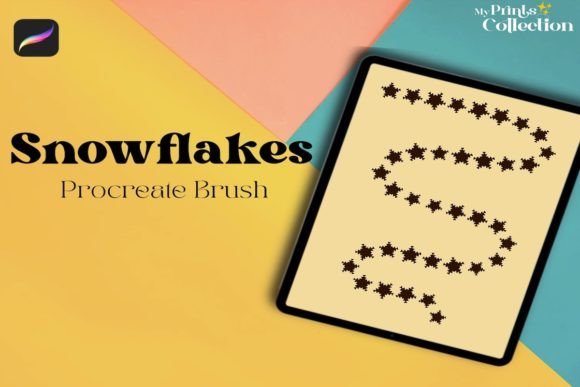
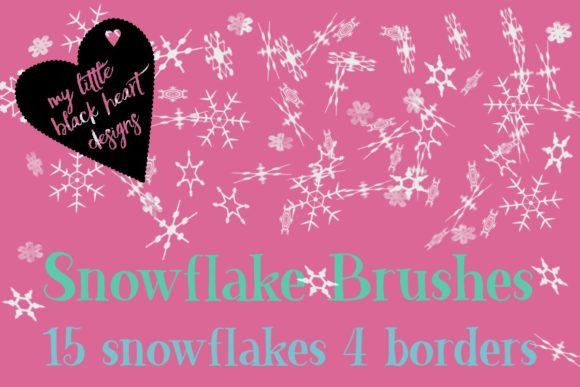
Snowflakes for Procreate addresses these pain points by providing a curated collection of fifteen distinct snowflake designs. These are not generic stamps; they are carefully crafted to offer variety in shape and structure. Some flakes feature applied grain, which adds a subtle texture that prevents them from looking too clean or vector-like. This attention to detail ensures that your artwork retains a handcrafted, organic aesthetic, even when using digital shortcuts. The inclusion of scatter functionality means you can paint sweeping drifts or gentle falls with a single stroke, dramatically reducing the time spent on background elements.
Versatility Beyond the Brush Engine
One of the most significant advantages of this resource is its flexibility across different software platforms and user skill levels. While optimized for Procreate, the utility of Snowflakes for Procreate extends far beyond iPad users. The package includes large black PNG files at a high resolution of 4000x4000 pixels, as well as smaller color PNGs of all snowflakes and borders. This means that even if you do not own Procreate, you can still utilize these assets effectively.
For designers working in Adobe Photoshop, Affinity Designer, or Illustrator CS6, these PNGs serve as high-quality clipart or texture overlays. You can drag and drop them into your compositions, adjust their opacity, and blend modes to integrate them seamlessly into your work. Additionally, the set includes specific files tailored for Affinity, Illustrator, and Photoshop, ensuring that vector-based workflows are also supported. This cross-platform compatibility makes it a practical investment for freelancers and agencies who may need to switch between programs depending on client requirements.
Practical Applications for Winter-Themed Projects
The applications for this brush set are diverse, catering to both hobbyists and professional illustrators. Here are several ways you can implement these tools to enhance your winter art:
- Greeting Cards and Invitations: The four premade borders included in the set are perfect for framing text. Whether you are designing holiday cards, wedding invitations for winter ceremonies, or party invites, these borders provide an instant festive structure without requiring complex layout skills.
- Digital Scrapbooking: The varied snowflake shapes allow for layered compositions. By toggling the scatter setting off, you can place individual, large snowflakes as focal points or decorative elements around photos and journaling blocks.
- Background Textures: Use the scattered brush mode to create subtle backgrounds for websites or social media posts. The grain applied to some flakes adds visual interest without overwhelming foreground content.
- Character Illustration: Add atmospheric context to character portraits by painting falling snow around the subject. The natural variation in flake size and shape helps create a sense of depth and movement.
Customizing Your Workflow
Understanding how to manipulate the brush settings is key to getting the most out of Snowflakes for Procreate. By default, the brushes are set to scatter, which distributes the snowflakes randomly along your stroke path. This is ideal for creating dynamic snowfalls. However, if you need precise placement, you can easily turn off the scatter function in the brush settings under the "Shape" menu. This transforms the tool from a broad atmospheric painter into a precise stamping tool, allowing you to place single, detailed snowflakes exactly where you want them.
Artists should experiment with opacity and flow settings to achieve different effects. Lowering the opacity can create the illusion of distant snow, while higher opacity works well for foreground elements. Combining the black PNGs with color overlays in post-production can also yield unique results, allowing you to match the snowflakes to any color palette, from icy blues to warm golds.
Who Benefits Most from This Set?
Different users will approach Snowflakes for Procreate with varying goals. Professional illustrators may value the time-saving aspect, using the brushes to quickly add finishing touches to client work. The high-resolution PNGs ensure that these finishes remain crisp even in print-ready formats. Hobbyists and beginners, on the other hand, may appreciate the ease of use. The premade borders and ready-to-use stamps lower the barrier to entry for creating polished-looking designs, boosting confidence and encouraging experimentation.
Teachers and educators creating winter-themed materials can also benefit significantly. The ability to quickly generate decorative elements allows for the creation of engaging worksheets, presentations, and classroom decorations without spending hours on graphic design. The inclusion of multiple file formats ensures that regardless of the technology available in the classroom, the resources remain accessible.
Integration with Larger Bundles
For those already invested in seasonal digital art resources, it is worth noting that this set is part of the original snowflakes collection and the Procreate Christmas bundle. If you already own these larger packages, you may already have access to these tools. However, for new users, purchasing this standalone set provides a focused, high-quality solution for winter projects without the need to buy a comprehensive holiday bundle. It serves as an excellent entry point into seasonal digital illustration, offering professional-grade assets at a manageable scale.
In conclusion, Snowflakes for Procreate is more than just a brush pack; it is a versatile toolkit for enhancing winter-themed digital art. By addressing common challenges such as unnatural textures and time-consuming manual placement, it empowers artists to create beautiful, atmospheric pieces efficiently. Whether you are designing cards, illustrating scenes, or adding subtle textures to web graphics, this set provides the flexibility and quality needed to bring your winter visions to life. With support for multiple platforms and customizable settings, it remains a practical and valuable addition to any digital artist’s library.