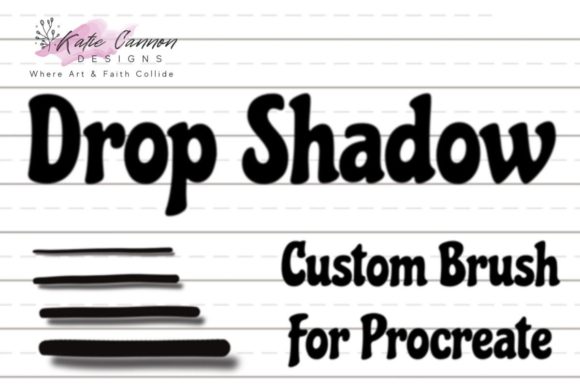
Drop Shadow Brush for Procreate
Adding depth and dimension to digital artwork can often feel like the final hurdle between a flat illustration and a professional piece. While many artists spend hours manually painting shadows layer by layer, there is a more efficient way to achieve that grounded, realistic look. The Drop Shadow Brush for Procreate is designed specifically to streamline this process, allowing creators to add instant, textured shading with a single stroke. This tool is not just about speed; it is about enhancing the visual weight of your subjects, making them pop off the canvas in a natural, organic way.
This listing includes one specialized Procreate brush file. It is important to note that this is a textured, handmade brush, meaning it carries the subtle imperfections and character of traditional media rather than the sterile perfection of a standard digital tool. Because it is crafted with attention to detail, it works seamlessly on most iPad Pro versions, providing a consistent experience whether you are using an older model or the latest release. For anyone looking to elevate their digital portfolio, understanding how to integrate this specific tool into your workflow can save time while significantly boosting the aesthetic quality of your work.
Why Texture Matters in Digital Shadows
Digital art sometimes suffers from looking too clean. When shadows are created with standard soft airbrushes, they can appear muddy or artificial. A textured handmade brush introduces grain, variation, and edge complexity that mimics how light interacts with real-world surfaces. This particular brush is engineered to cast shadows that feel tangible. Whether you are illustrating a character standing on pavement or designing a product mockup for a client, the texture adds a layer of realism that viewers subconsciously appreciate.
The appeal of this brush lies in its versatility. It is not limited to one style. Graphic designers can use it to ground logos and typography, giving them a three-dimensional presence on social media graphics. Illustrators can use it to define the space between characters and their backgrounds without committing to complex lighting studies. Even hobbyists who enjoy journaling or digital scrapbooking will find that adding a subtle drop shadow helps separate elements, creating a cleaner and more organized composition.
Practical Uses for Creators and Professionals
Understanding where to apply this tool is key to getting the most value out of it. Here are several contexts where the Drop Shadow Brush for Procreate shines:
- Social Media Content: Entrepreneurs and marketers often create quote cards or promotional images. Adding a textured shadow behind text or product photos makes the content stand out in crowded feeds.
- Character Design: Freelance illustrators can quickly ground their characters. Instead of leaving figures floating in white space, a quick swipe with this brush anchors them to the floor.
- Educational Materials: Teachers and educators creating digital worksheets or presentations can use the brush to highlight key terms or separate instructional boxes, improving readability and visual hierarchy.
- Sticker Design: For those selling digital stickers or printables, a consistent shadow style gives a cohesive look to a whole shop collection, making the products appear more premium.
The beauty of this brush is that it supports both quick sketches and polished final pieces. It allows beginners to experiment with lighting concepts without needing advanced knowledge of color theory or perspective drawing. For professionals, it serves as a reliable asset in a tight deadline scenario, ensuring high-quality output without excessive manual labor.
How to Install and Use Your New Brush
If you are new to importing custom tools into Procreate, the process might seem slightly technical at first, but it is quite straightforward. Since digital files are often compressed to save space and ensure secure delivery, you will need to know how to handle the download correctly. This is a listing for 1 Procreate Brush, and here is exactly how to get it running on your device.
- Download the File: After purchase, you will receive a ZIP file. This is a compressed folder that contains your brush data.
- Unzip the File: You must have a way to un ZIP a file on your iPad. If you are using the Files app, simply tap the ZIP file, and iOS will automatically extract it into a folder. If you are on a computer, unzip it there and send the extracted
.brushfile to your iPad via AirDrop or email. - Import to Procreate: Open the extracted folder in your Files app. Tap on the
.brushfile. It should automatically open Procreate and install the brush into your "Imported" brush set. - Start Creating: Open your canvas, select the new brush from your library, and start experimenting with pressure and angle to see how the texture reacts.
Once installed, this textured handmade brush for Procreate will work on most iPad Pro versions. It is optimized to respond to the Apple Pencil’s tilt and pressure sensitivity, giving you control over the opacity and spread of the shadow. This is a great way to add texture without needing multiple layers or complex blending modes.
Things to Consider Before You Start
While this tool is powerful, keeping a few practical observations in mind will help you achieve the best results. First, remember that every screen displays color and contrast differently. Test your shadows on different backgrounds to ensure they remain visible but not overpowering. A drop shadow should support the subject, not distract from it.
Secondly, consider the resolution of your canvas. If you are working on a very large document for print, you may need to adjust the brush settings slightly to maintain crisp edges. However, for most digital uses such as web graphics, Instagram posts, or digital planning, the default settings will work perfectly.
Finally, think about consistency. If you are building a brand or a series of illustrations, stick to one direction for your light source. Using the Drop Shadow Brush for Procreate consistently will create a signature look that audiences can recognize. It transforms a simple shape into a designed element with weight and presence.
Whether you are a small business owner looking to polish your marketing materials or an artist seeking to add depth to your sketches, this brush offers a simple yet effective solution. It bridges the gap between technical skill and artistic vision, allowing you to focus more on creativity and less on repetitive tasks. By integrating this textured tool into your daily workflow, you enhance not just your images, but your overall efficiency as a digital creator.