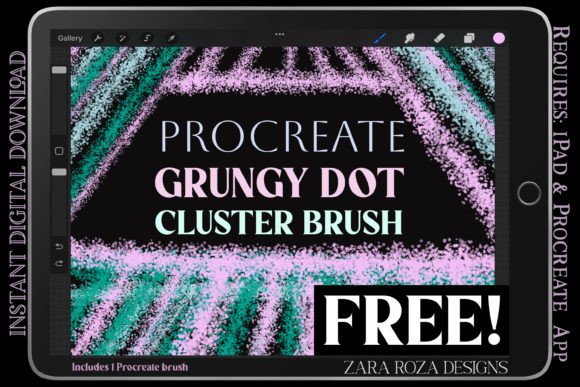
Free Procreate Grungy Dot Cluster Brush
Texture is often the missing ingredient in digital art. While vector lines and flat colors offer precision, they can sometimes feel sterile or overly polished. This is where the FREE Procreate Grungy Dot Cluster Brush steps in as a vital tool for artists seeking to inject organic warmth into their work. Designed specifically for the iPad and Apple Pencil, this brush bridges the gap between rustic charm and modern design sensibilities.
The core appeal of this tool lies in its unique construction. Unlike standard round brushes that lay down solid pigment, this brush utilizes a cluster of dots infused with a grain charcoal texture. The result is a natural, grainy aesthetic that mimics traditional media like stippling ink or dry pastel. Whether you are working on shading, adding tonal elements, or creating stylized illustrations, this brush provides an immediate layer of depth and tactile quality that flat digital strokes simply cannot achieve.
Understanding the Dual-Version System
Versatility is key when building a reliable digital toolkit. Recognizing that different artistic tasks require different levels of control, this freebie includes two distinct versions of the same brush engine. Understanding when to use each version can significantly streamline your workflow and improve the final output of your projects.
- Regular Line Control: This original version retains a raw, authentic feel. It is ideal for rough sketching, shading, and drawing where you want the texture to be prominent and slightly unpredictable. The irregularity of the line adds character, making it perfect for backgrounds or areas where a hand-drawn, imperfect look is desired.
- Smooth Line Version: For tasks requiring more precision, such as hand lettering or detailed graphic design elements, the smooth line version offers streamlined control. It maintains the grungy dot texture but applies it with greater consistency, ensuring that your lines remain legible and clean while still benefiting from the organic grain.
Having both options allows you to switch seamlessly between broad, expressive strokes and refined, controlled details without leaving your canvas. This adaptability makes the brush suitable for a wide range of disciplines, from loose conceptual sketches to polished client deliverables.
Creative Applications and Project Ideas
The utility of the FREE Procreate Grungy Dot Cluster Brush extends far beyond simple texturing. By integrating this tool into various stages of your creative process, you can elevate standard designs into something more engaging and visually complex. Here are several practical ways to incorporate this brush into your work.
Enhanced Shading and Tone
One of the most effective uses for this brush is as a dots shader. Instead of using soft airbrushes that can look muddy, try building up shadows with clusters of grungy dots. This technique, reminiscent of traditional stippling, allows for gradual tonal transitions that retain sharpness and clarity. It is particularly useful in comic book styles, editorial illustrations, and portrait work where you want to define form without losing the energy of the line work.
Rustic Modern Lettering
Hand lettering has seen a surge in popularity, especially in branding and social media graphics. The smooth line version of this brush is exceptionally well-suited for creating typography that feels approachable and artisanal. Use it to draft initial concepts or to add texture to finalized letters. The grain charcoal effect prevents the text from looking too digital, giving it a printed, vintage vibe that resonates well with audiences looking for authenticity.
Textural Backgrounds
Flat backgrounds can make foreground elements pop, but they can also feel empty. Use the regular version of the brush to create subtle, noisy backgrounds. By lowering the opacity and using a neutral color, you can add a layer of visual interest that does not distract from the main subject. This is particularly effective in web design mockups, poster designs, and packaging concepts where brand identity relies on tactile associations.
Adapting the Brush for Different Audiences
Different creators have different needs. A marketer might prioritize speed and clarity, while an illustrator might focus on expression and style. Here is how various professionals can adapt this tool to their specific goals.
For Graphic Designers: Focus on the smooth line version for creating icons, logos, or UI elements that need a human touch. The consistent dot pattern ensures scalability and readability, while the texture adds a unique brand signature that sets your work apart from generic stock assets.
For Illustrators and Painters: Embrace the irregularity of the regular version. Use it for underpainting or to break up large blocks of color. It works beautifully in stylized illustration where the goal is to evoke a mood rather than achieve photorealism. Experiment with blending modes; multiplying the dot clusters over a base color can create rich, complex shadows.
For Educators and Hobbyists: This brush is an excellent teaching tool for demonstrating value and form. Because the dots build up gradually, students can clearly see how density affects perceived darkness. It encourages a mindful approach to drawing, slowing down the process and focusing on placement rather than just speed.
Tips for Consistent and Effective Results
To get the most out of the FREE Procreate Grungy Dot Cluster Brush, consider these practical recommendations to keep your results clear and organized.
- Mind Your Pressure Sensitivity: Since the brush relies on dot clusters, heavy pressure may merge the dots into a solid mass, losing the grunge effect. Practice using light to medium pressure to maintain the separation between dots, preserving the airy, textured look.
- Layer Management: Keep your textural elements on separate layers. This allows you to adjust the opacity or blending mode later without affecting your underlying line art or base colors. It also gives you the flexibility to erase specific areas if the texture becomes too overwhelming.
- Color Choice Matters: While black and white are classic choices for stippling, do not shy away from colored dots. Using a dark blue or deep brown for shadows can add warmth and depth that pure black lacks. Ensure there is enough contrast between your dot color and the background to maintain legibility.
- Combine with Other Tools: This brush shines when used in conjunction with cleaner tools. Use a standard monoline brush for primary outlines and the grungy dot brush for filling and shading. This contrast creates a dynamic visual hierarchy that guides the viewer’s eye.
Incorporating the FREE Procreate Grungy Dot Cluster Brush into your digital arsenal opens up new avenues for expression. It reminds us that digital art does not have to be cold or perfect. By embracing the grain, the noise, and the organic imperfections of this tool, you can create work that feels human, grounded, and genuinely engaging. Whether you are sketching a quick idea or polishing a final piece, let this brush help you add that essential touch of rustic modernity to your creations.